MicClean Resolve
A downloadable tool for Windows and macOS
MicClean Resolve 4.0
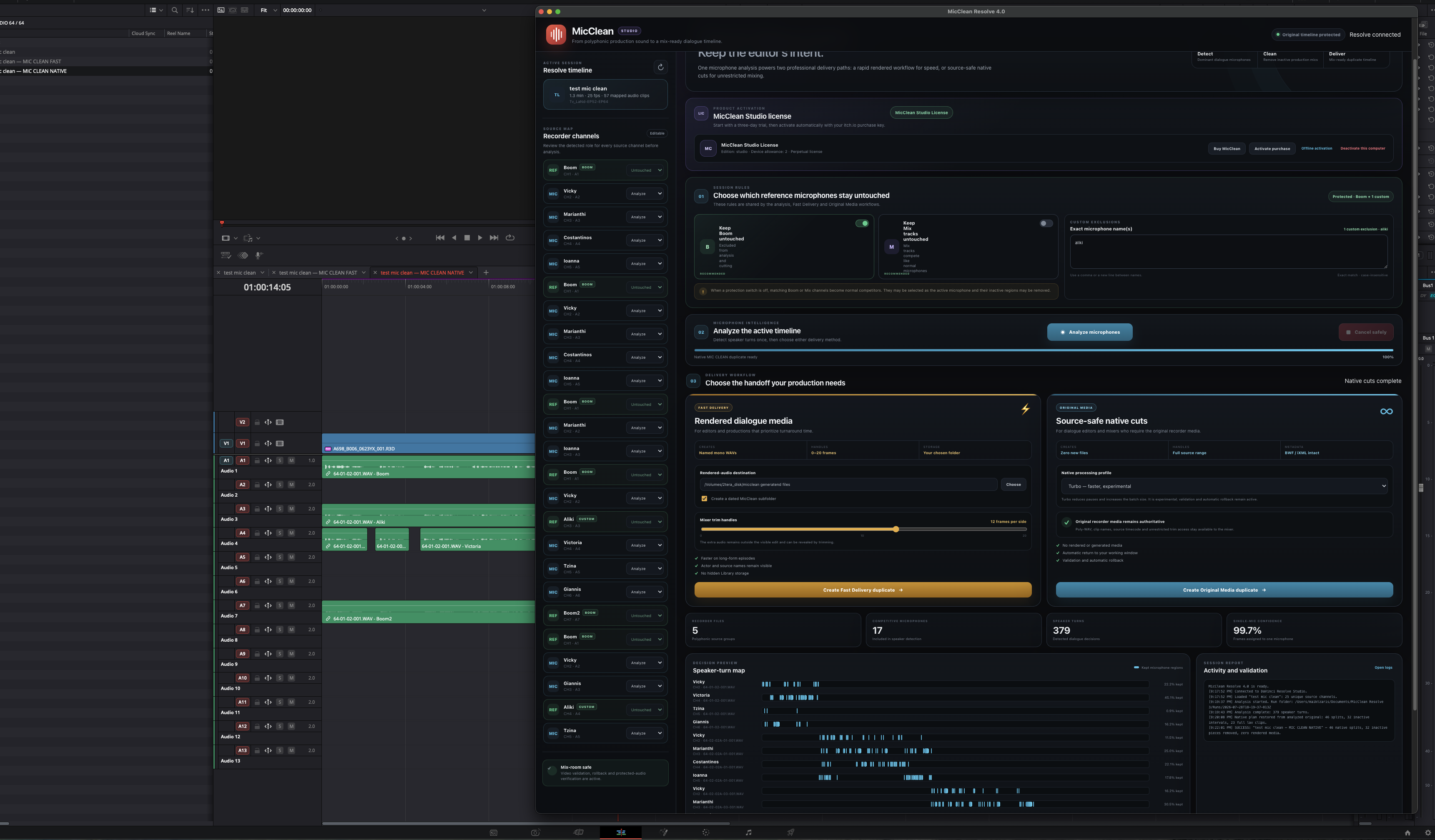
MicClean Resolve is a professional dialogue-cleaning workflow integration for DaVinci Resolve, available for macOS and Windows.
Production sound recordings often contain several isolated microphones alongside Boom, Mix or other reference tracks. During editing, inactive microphones may remain open, adding unwanted room tone, clothing noise, bleed and background sound to the dialogue mix. Cleaning these tracks manually can require hundreds of repetitive edits.
MicClean Resolve automates this process directly from the active Resolve timeline.
The application analyses the selected production-audio tracks, detects dialogue activity and identifies speaker turns. It then keeps the relevant microphones active while reducing or removing inactive production microphones. Boom, Mix and other protected reference channels can remain untouched according to your settings.
Main features
- Automatic analysis of multichannel production dialogue
- Speaker-turn and microphone-activity detection
- Automatic cleaning of inactive lavalier microphones
- Protection for Boom, Mix and custom reference-track names
- Custom microphone exclusions
- Native processing engine for macOS and Windows
- Visible progress window during processing
- ESC key cancellation for long operations
- Safe workflow designed to protect the original timeline
- Multiple delivery options for different post-production workflows
- Online purchase verification and secure signed licensing
MicClean Resolve is designed for editors, dialogue editors, documentary teams and post-production professionals working with interviews, television, film and other productions recorded with multiple microphones.
Non-destructive workflow
MicClean works from the active Resolve timeline and is designed to preserve the original edit. Protected tracks remain untouched, while the processed result is prepared through the selected delivery workflow. Your original media files are not modified.
Trial and licensing
A free 3-day trial begins on first use. After purchasing, activation is completed by pasting the private itch.io purchase or download URL into MicClean.
Each purchase supports activation on up to two computers. Activations can be released from the application when moving the license to another machine.
Compatibility
- DaVinci Resolve with Workflow Integrations support
- macOS: Apple Silicon and Intel
- Windows: 64-bit Windows 10 or Windows 11
- Internet connection required for purchase activation
Download the installer for your operating system, complete the installation, restart DaVinci Resolve and open:
Workspace → Workflow Integrations → MicClean Resolve
Purchase
In order to download this tool you must purchase it at or above the minimum price of 49.00€ EUR. You will get access to the following files: